
Netvisorin julkaisutiedote kokoaa yhteen tuotteeseen tehdyt uudistukset, parannukset ja korjaukset. Tiedotteelta löydät sekä pitkän aikavälin kehityssuunnitelman mukaiset tuotejulkaisut että asiakastoiveiden perusteella tunnistetut ja toteutetut muutokset. Tavoitteemme on tehdä Netvisorista aina vain parempi sen jokaiselle käyttäjälle!
Uutta Netvisorissa
Alta löydät tarkemmat tiedot viikon uudistuksista ja siitä, miten ne parantavat arkeasi.
Myynti
Tilisiirron luominen hyvityslaskusta ja ylisuorituksesta
Olemme lisänneet saamamme asiakaspalautteen perusteella mahdollisuuden luoda tilisiirron suoraan hyvityslaskusta ja ylisuorituksesta. Uusi toiminto löytyy suoraan laskulta valikosta: Myyntilaskun toiminnot > Luo tilisiirto.
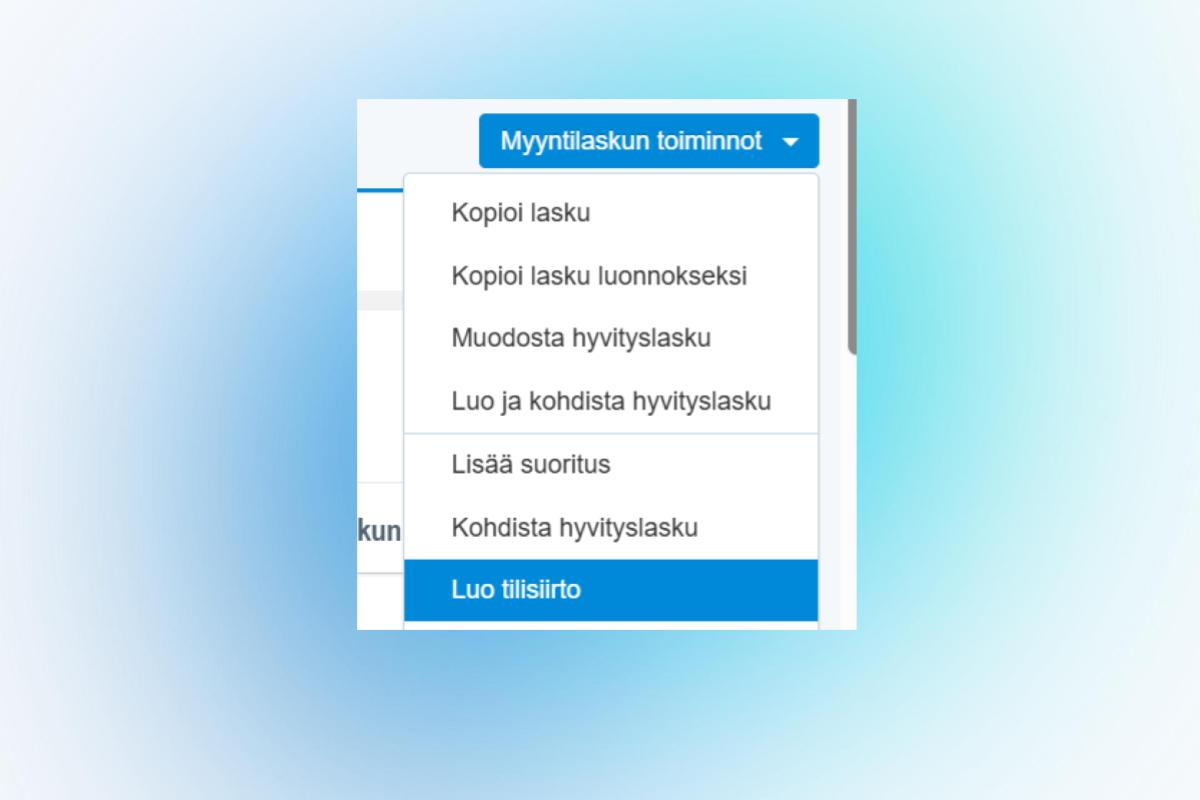
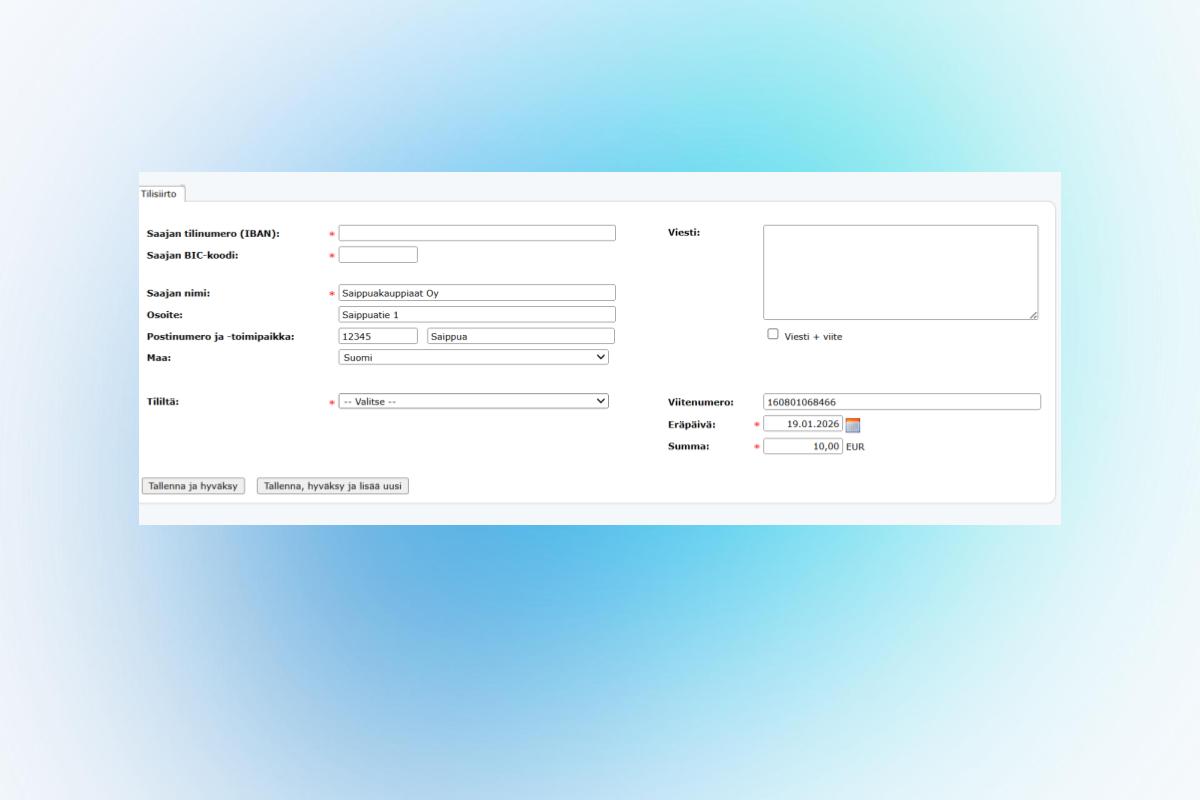
Muodostuvalle tilisiirrolle tulee automaattisesti saajan tiedot, laskun viitenumero ja maksettava summa. Eräpäiväksi muodostuu oletuksena laskun eräpäivä. Mikäli laskun eräpäivä on mennyt, niin tällöin tilisiirron eräpäiväksi tulee se päivä kun tilisiirto luodaan. Uuden toiminnon avulla voitte käsitellä entistä nopeammin mahdolliset rahanpalautustilanteet myyntireskontrassa.
Sopimuslaskutuksen laskutusennusteen tarkentuminen
Sopimuslaskutuksen palvelukorin laskutusennuste huomioi jatkossa asiakaskohtaisten tuotteiden aktiivisuusajat. Tämä muutos parantaa ennusteen tarkkuutta.
Palkat
Automaatio työsuhteiden hallintaan
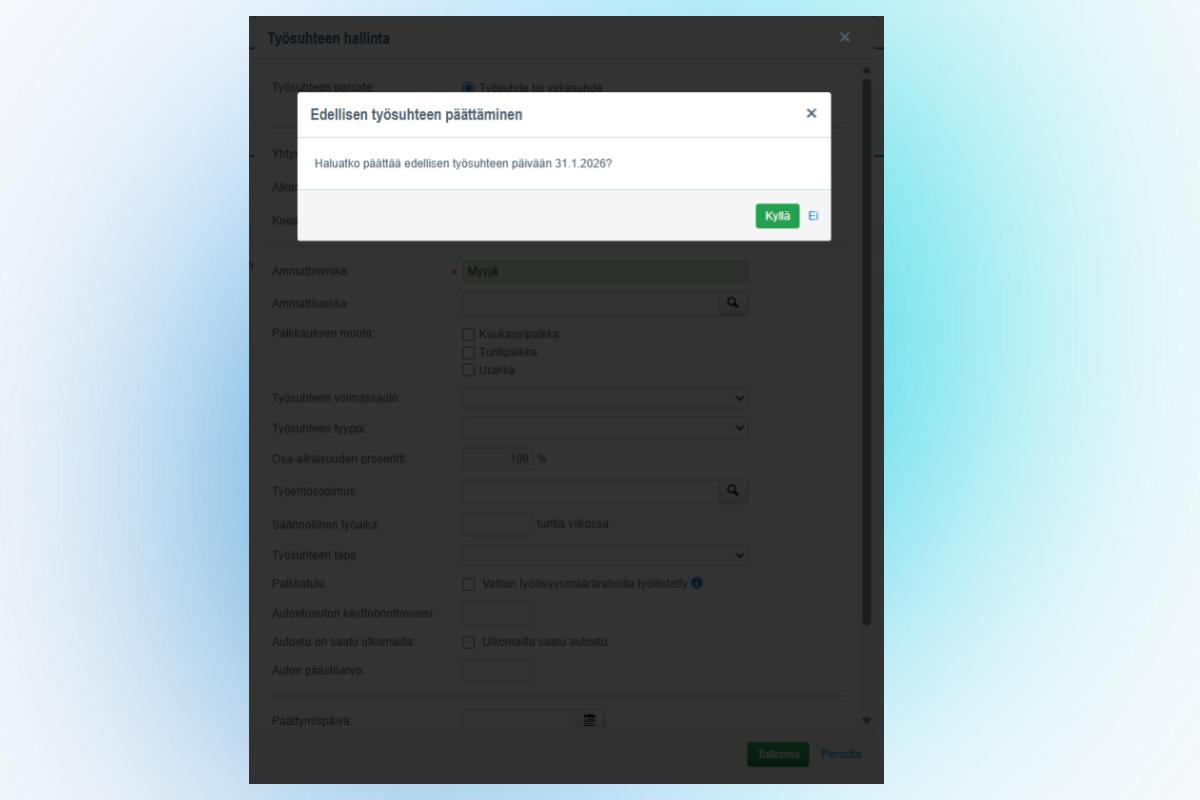
Työsuhteen hallintaan on lisätty uusi automaatiotoiminto. Kun henkilölle lisätään uusi työsuhde, ohjelma avaa dialogin, jonka hyväksymällä edellinen työsuhde päätetään automaattisesti uuden työsuhteen alkamispäivää edeltävään päivään. Tämä uusi toiminto nopeuttaa työsuhteiden hallinnointia.
Palkkamallikohtaiset muistutukset
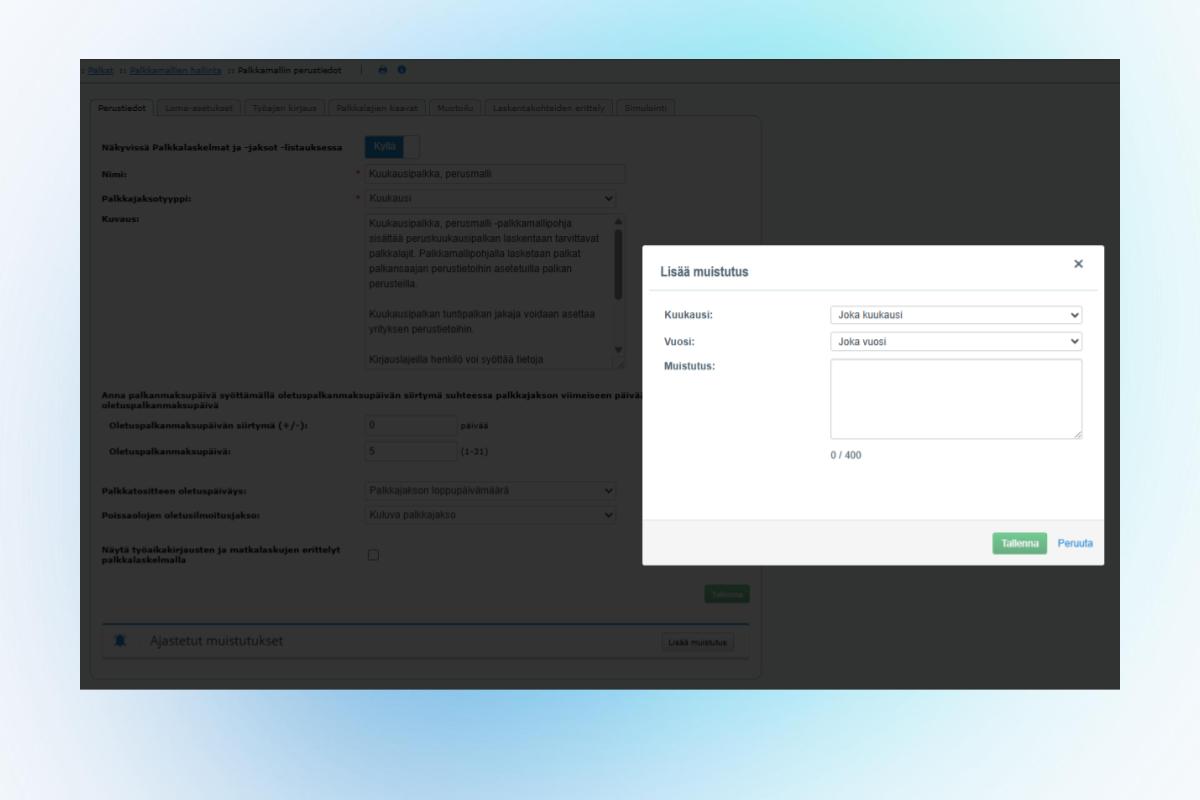
Lisäsimme palkkamallin asetuksiin uuden ominaisuuden, jonka avulla voit luoda palkkamallikohtaisia muistutuksia. Voit lisätä ajastetun muistutuksen suoraan palkkamallin asetuksista. Asetettu muistutus näytetään palkanlaskijalle palkkaprosessin aikana Palkkaperusteiden tarkistus -näkymässä. Toiminnallisuuden avulla palkanlaskija voi vähentää muistikuormaa ja varmistaa että palkkamallikohtaiset asiat tulee huomioitua palkkaprosessin aikana.
Laskentakohdetilaston parannus
Olemme parantaneet laskentakohdetilastoa lisäämällä raportille uuden palkkalajikohtaisen näkymän, joka parantaa palkanlaskennan raportointia.
Tulolajimuutos lomakorvauksiin
Teimme muutoksen "Lomakorvaus lomarahasta" -alkuisten palkkalajien tulolajikäsittelyyn. Jatkossa näissä käytetään tulolajia "213 Lomaraha" aiemman "234 Vuosilomakorvaus" sijaan.
Kirjanpito
Kohdelaskentataulukon käytettävyyttä parannettu
Olemme selkeyttäneet Kohdelaskentataulukko tuloslaskelmamuodossa (käännetty) -raporttia. Raportilta on poistettu linkitykset niiltä riveiltä, joista ei ole mahdollista porautua tilikohtaisiin kirjauksiin. Tämä parantaa raportin luettavuutta ja käytettävyyttä.
Integraatiot
Tuki .jfif-tiedostoille
Lisäsimme asiakastoiveiden perusteella rajapinnan liitteille tuen .jfif-tiedostopäätteelle.
Pysy ajantasalla Netvisoriin tehdyistä uudistuksista ja tilaa julkaisutiedotteet suoraan sähköpostiisi! Siirry Communityssä Tuoteuutiset-osioon ja valitse yläkulmasta Seuraa-painike, jotta saat uudet julkaisut ensimmäisten joukossa luettavaksi.
Korjaukset
Olemme korjanneet seuraavat järjestelmässä havaitut virheet varmistaaksemme sujuvan käytön:
Palkat: Korjattu virhe, jossa palkkatodistus-raportin pikalinkki tallentui tarpeettomasti uudelleen siirryttäessä palkanlaskennan raportteihin ja käytettäessä "Näytä raportti" -toimintoa.
Palkat: Parannettu palkkatodistuksen luettavuutta varmistamalla, etteivät pitkät kommentit enää limity raportin alatunnisteen päälle.
Kirjanpito: Korjasimme ongelman laskentakohteiden hallinta -näkymässä, jossa laskentakohteiden järjestäminen raahaustoiminnolla (drag and drop) saattoi aiheuttaa epäjohdonmukaisuuksia laskentakohdehierarkiassa. Järjestelmä varmistaa nyt automaattisesti, että näkymä on ajan tasalla myös muiden tekemien muutosten osalta, ja päivittää hierarkian oikeaan järjestykseen siirron jälkeen.
Netvisor Release Notes – January 22, 2026
The Netvisor release note compiles the updates, improvements, and fixes made to the product. In the release note, you will find both product releases according to the long-term development plan and changes identified and implemented based on customer requests. Our goal is to make Netvisor even better for every user!
New in Netvisor
Below you will find detailed information about this week's updates and how they improve your daily work.
Sales
Creating a bank transfer from a credit note
Based on customer requests, we have added the ability to create a bank transfer directly from a credit note and overpayment. You can create the transfer using the Sales Invoice functions > Create bank transfer option. The transfer will automatically include the recipient's details, the invoice reference number, and the amount payable. By default, the due date will be set to the invoice's original due date. If that date has passed, the bank transfer's due date will be set to the current day (creation date). This new feature allows you to handle potential refunds in the sales ledger faster than ever.
Improvement to invoicing forecast
The invoicing forecast for the contractual invoicing service basket will henceforth take into account the activity periods of customer-specific products, ensuring more accurate forecasting.
Salaries
New automation for employment management
We have added a new automation feature to the management of employment details. When adding a new employment contract, a dialog will appear. By accepting it, the previous contract is automatically terminated on the day preceding the start date of the new contract. This new feature streamlines employment management.
Salary model specific reminders
We added a new feature to the salary model management: salary model specific reminders. You can add a scheduled reminder within the salary model settings. The reminder will be displayed during the payroll process in the Salary basis check view. This functionality reduces the payroll cognitive load and ensures that salary model-specific requirements are automatically considered during the payroll process.
Cost object statistics improvement
We improved the cost object statistics report by adding a new salary type-specific view, offering better visibility into cost breakdowns.
Income type update
We have updated the income types for pay components starting with "Holiday compensation from holiday bonus". Going forward, income type "213 Holiday bonus" will be used instead of "234 Annual holiday compensation".
Bookkeeping
Clarity improvement for Cost object table
We have improved the clarity of the Cost object table by in profit and loss statement form (transposed) report by removing links from rows where drilling down to account entries is not available.
Integrations
Support for .jfif files
Based on customer requests, we have added file validation support for the .jfif file extension in API attachments.
Stay up to date with Netvisor updates and subscribe to release notes directly to your email! Go to the Product News section in the Community and select the Follow button in the top corner to receive new releases among the first to read them.
Fixes
We have corrected the following system errors to ensure smooth usage:
Salaries: We have fixed an issue where the Salary Certificate shortcut link was unnecessarily resaved when returning to payroll reports and clicking the 'Show Report' button.
Salaries: We have improved the readability of the Salary Certificate by ensuring that long comments no longer overlap with the report footer.
Accounting: We have fixed an issue where manual reordering of dimensions (drag and drop) could lead to inconsistencies in the hierarchy. The system now automatically ensures the view is up-to-date with any external changes and refreshes the hierarchy after reordering to keep your data organized and accurate.
