Tiedote Netvisorin etusivulla MD5 ja SHA256 -tuen päättymisestä liittyy rajapinnan tietoturvan kehitykseen, jonka johdosta vanha MD5- ja SHA256 -salausalgoritmi poistuu käytöstä. Tiedote näkyy Netvisorin pääkäyttäjälle riippumatta siitä onko integraatioita käytössä vai ei. Mikäli yrityksellänne ei ole käytössä integraatioita, ei tiedote vaadi teiltä toimenpiteitä.
Netvisorin etusivulla näkyvä ilmoitus, ei tarkoita automaattisesti sitä, että integraation muutokset ovat tekemättä. Muutosten tekeminen tulisi varmistaa integraatiokumppanilta, tai tarkistaa itse Netvisorista Severan siirtohistoria lokilta.
Integraation salausalgoritmin tarkistus
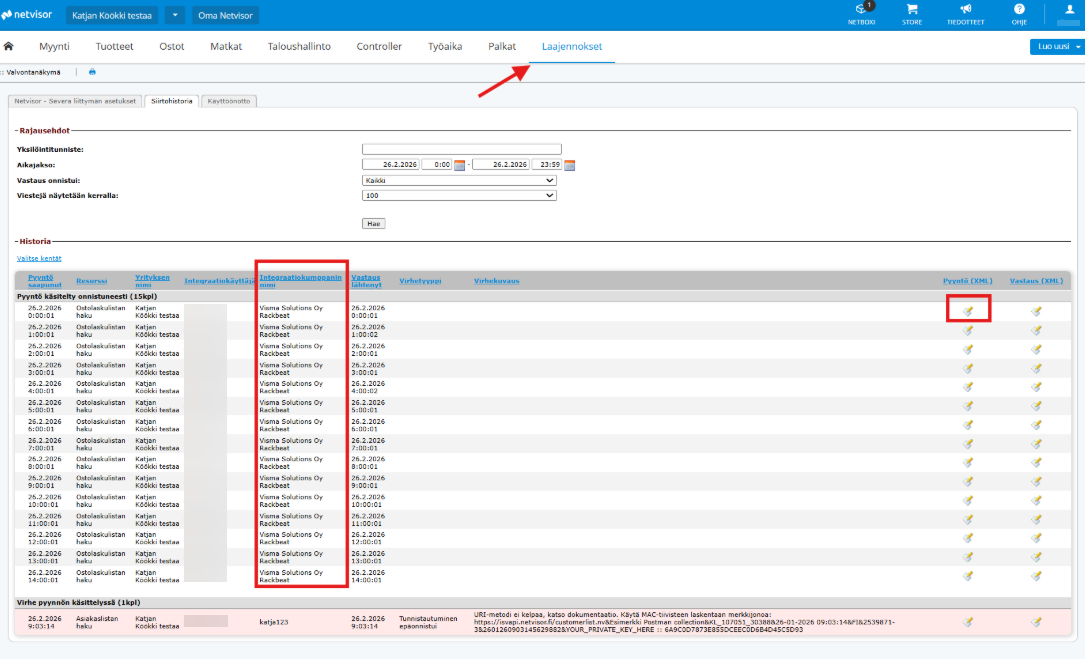
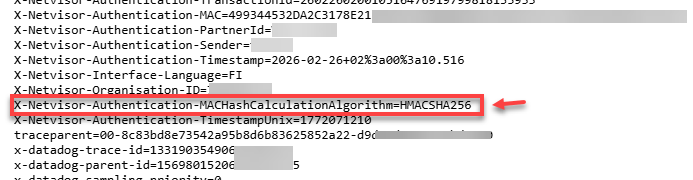
Netvisorin puolella rajapinnan tapahtumia ja virheitä pääsee tarkastelemaan kohdasta Laajennokset > Severa > Siirtohistoria (täältä näkee muidenkin integraatioiden tapahtumia kuin Severan). Näkymä vaatii KH-roolin. Näkymää pystyy rajaamaan päivämäärällä ja kellonajalla.
--------------------------
Notice regarding the discontinuation of MD5 and SHA256 support
The notice on the Netvisor home page regarding the end of support for MD5 and SHA256 is part of our ongoing commitment to interface security. As a result, the legacy MD5 and SHA256 encryption algorithms are being phased out. The notification is visible to the main user of Netvisor, regardless of whether integrations are in use or not. If your company does not use integrations, no action is required from you.
If your integration currently utilizes an old encryption algorithm, your integration partner (the service provider who implemented the integration) must update it to the new algorithm immediately. We have previously announced the discontinuation of MD5 and SHA256 algorithm support within the Netvisor production and training environment API. While the change was previously scheduled for February 28, 2026, we have decided to extend support until July 31, 2026. Following this date, support for MD5 and SHA256 will be officially discontinued.
Integration partners have been informed about this change since the spring of last year.
The notification on the Netvisor home page does not automatically mean that the necessary changes have not been made. You should verify the status directly with your integration partner or check the transfer history log in Netvisor yourself.
How to verify your integration status
In Netvisor, you can view interface events and errors by navigating to:
Extensions > Severa > Transfer History (Please note: this view also displays events for integrations other than Severa).
You must have the KH (Company Administrator) role to access this view. You can filter the view by date and time.
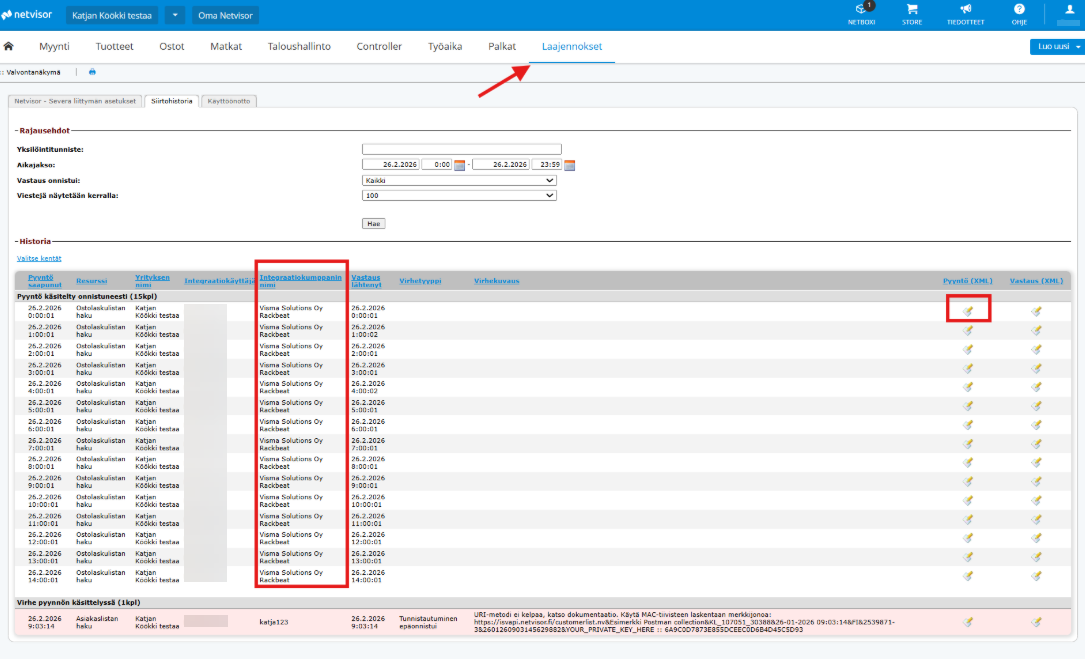
You can verify the algorithm by opening a specific message from the Request XML section:
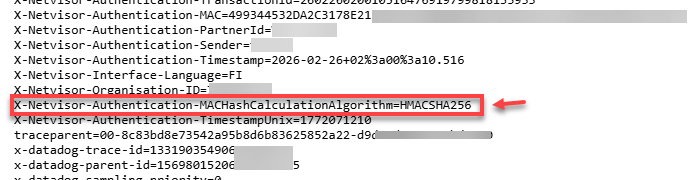
Check if the request header contains: X-Netvisor-Authentication-MACHashCalculationAlgorithm=HMACSHA256.
If it does: The integration has been successfully updated.
If you see SHA256 (or MD5): The integration is still using a legacy algorithm, and your integration partner must update the encryption.
Further technical details can be found from here: https://support.netvisor.fi/fi/support/discussions/topics/77000290735
Note: This notice does not apply to integrations found in the Netvisor Store, nor to Severa, Sympa or Netvisor Mobile integrations; their encryption algorithms are already up to date.
