CONTENTS
- General information about auxiliary business name
- Adding and editing a new auxiliary business name
- Auxiliary business name's own invoice number series and integration
- Frequently asked questions
This help guides you in adding and managing auxiliary business names. Auxiliary business names can be utilized in sales invoicing. You will also learn how to set settings related to auxiliary business names for sales invoices. The help includes information about invoice number series and how to set a specific bank account for an auxiliary business name.
Adding auxiliary business names enables individual handling for the company's auxiliary business names in terms of sales invoices, orders, bank account information, logos and the invoice number series used. You can open the view or perform the function by selecting Sales > Basic data and settings > Auxiliary business names.

General information about auxiliary business name
Adding an auxiliary business name allows the company to invoice using the information of this auxiliary business name. In this case, the sales invoice will show the auxiliary business name, address information, logo and possibly a different bank account than for the main business name.
You can use an auxiliary business name in sales invoicing in two ways:
- Select the auxiliary business name when creating the sales invoice.
- Save the auxiliary business name directly for the desired customers, in which case the auxiliary business name will be automatically added to the invoice.
The auxiliary business name is added to the customer on the customer's additional information editing tab in the auxiliary business name field.

Netvisor does not have direct separate reporting for auxiliary business names. However, with the extended search in the sales invoice list, you can search for invoices of the desired existing auxiliary business name.
- Open the sales invoice list.
- Select extended search.
- Select the desired auxiliary business name as the search criterion.
- Run the search.

There is no handling of auxiliary business names in Accounts payable. The auxiliary business name only affects the sales side.
Adding and editing a new auxiliary business name
Managing auxiliary business names requires function-specific rights to manage basic data.
- Make sure you have rights to manage basic data.
- Select Sales > Basic data and settings > Auxiliary business names.
- Select New auxiliary business name.
- Fill in the auxiliary business name information and save.
Set the company's name as the recipient of the payment on the invoice: With this option, the official name of the company can be set as the recipient of the payment for invoices sent with the auxiliary business name. The change is related to the EU's instant payment regulation that came into effect in October 2025. When the official name of the company is visible on the invoice, it ensures smooth payment processing and reduces rejections or warnings made by banks' checks.

Logo
The logo is first added in Company menu > Company basic data and settings > Logo. After this, the logo can be selected in the auxiliary business name information.
- Select Company menu > Company basic data and settings > Logo.
- Add the company logo.
- Go to the auxiliary business name information.
- Select the added logo for the auxiliary business name.
Bank accounts used
Select the bank account(s) used by the auxiliary business name. This selection affects which bank account will appear on the auxiliary business name's sales invoices.
- Open the auxiliary business name information.
- Select the bank account(s) used by the auxiliary business name.
- Save the changes.
If you want only certain bank accounts to be visible for the auxiliary business name, these bank accounts must also be visible for the main business name.
If you want the main business name not to show the auxiliary business name's bank accounts, proceed as follows:
- Create an auxiliary business name for the main business name.
- Use two auxiliary business names in invoicing (the main business name's auxiliary business name and another auxiliary business name).
If no auxiliary business name is selected for the sales invoice in this case, all accounts whose information (Company menu > Bank accounts) have the "Show on invoice form" option will be printed on the sales invoice.
The auxiliary business name can be saved in the customer's additional information tab in the auxiliary business name field. This way, the selected auxiliary business name will be directly chosen when a new invoice is made for the customer.
- Open the customer information.
- Select the additional information editing tab.
- Select the auxiliary business name in the auxiliary business name field.
- Save the customer information.
When you add the auxiliary business name directly for the desired customers, the auxiliary business name will be preselected on a new invoice when you create an invoice for these customers.

Invoice number series
It is possible to define own invoice number series for auxiliary business names. When an invoice number series is activated for one auxiliary business name, the invoice number series in use are visible to other auxiliary business names. New series are easy to define, and the creation of overlapping series is prevented.
- Open the auxiliary business name settings.
- Define an invoice number series for the auxiliary business name.
- Save the invoice number series settings.
When auxiliary business names are in use, and own invoice series are defined for them, the system changes the invoice number when the auxiliary business name is selected for use on the sales invoice.
Note! The minimum range for invoice number series is 2,000,000 numbers. An auxiliary business name can have only one invoice number series, so the series should be defined large enough.
When invoice number series are activated, invoices that are not charged through auxiliary business names (going through the basic company) will receive the next number according to the largest invoice number series. This can cause a large gap in invoice numbering compared to previously invoiced invoices.
If the company has order processing in use, the order number series is sequential, and a new order always receives the largest number, even if an auxiliary business name is given for the order. When the order is invoiced, the next largest number from the auxiliary business name's number series will be used for the invoice.
Auxiliary business name's own invoice number series and integration
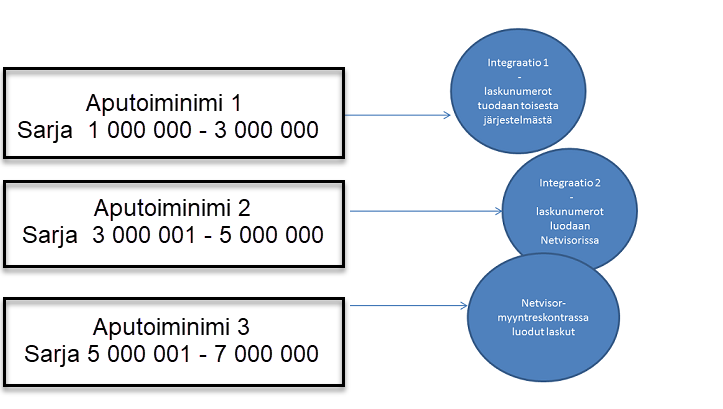
Separate invoice series can be used as an aid when importing sales invoices as integration material into Netvisor. The import of auxiliary business names is supported in the interface, so invoice number series can be defined for invoices imported through the integration, which are created in Netvisor.
If the company has multiple interfaces from which invoices are imported, all material can be kept in its own series.
Example:
For more detailed instructions related to importing sales invoices, see here.
Frequently asked questions
Question: How do I add a new auxiliary business name and enable it on sales invoices?
First make sure you have rights to manage basic data. Then select Sales > Basic data and settings > Auxiliary business names and select New auxiliary business name. Fill in the auxiliary business name information, define the logo, bank accounts and invoice number series if needed, and save. Select the auxiliary business name when creating a sales invoice or save it in the customer's additional information tab in the auxiliary business name field, in which case the auxiliary business name will be automatically added to the invoice.
Question: How do I show the auxiliary business name's invoices in reports?
Netvisor does not have separate reporting for auxiliary business names, but you can search for the auxiliary business name's invoices with the extended search in the sales invoice list. Open the sales invoice list, select extended search, select the desired auxiliary business name as the search criterion and run the search.
Question: How do I define an invoice number series for an auxiliary business name?
Open the auxiliary business name settings and define an invoice number series for the auxiliary business name. Note that the minimum range for invoice number series is 2,000,000 numbers and an auxiliary business name can have only one invoice number series. When you select the auxiliary business name on a sales invoice, the system will automatically use the auxiliary business name's invoice number series.
Question: How are bank accounts shown on the auxiliary business name's sales invoices?
Select the bank account(s) used by the auxiliary business name in the auxiliary business name information. If you want only certain bank accounts to be visible for the auxiliary business name, make sure that the same accounts are also visible for the main business name. If no auxiliary business name is selected for the sales invoice, all accounts whose information (Company menu > Bank accounts) have the "Show on invoice form" option will be printed on the invoice.
Question: Does the auxiliary business name affect Accounts payable?
The auxiliary business name does not affect Accounts payable. Handling of auxiliary business names only concerns the sales side.
Question: How do I use the auxiliary business name's invoice number series with integration?
You can use separate invoice series when importing sales invoices as integration material into Netvisor. The import of auxiliary business names is supported in the interface, so invoice number series can be defined for invoices imported through the integration, which are created in Netvisor. If the company has multiple interfaces, the invoices from each interface can be kept in their own series.
Keywords: Auxiliary business name, auxiliary business names, sales invoices, bank accounts, invoice number series, integration
Did you find it helpful? Yes No
Send feedback