This help article covers updating employee information such as name, personal identity code, nationality, and phone number. Some information can be edited directly from the user interface, while other changes require contacting Netvisor support for security reasons.
CONTENT
- Changing the name
- Changing the employee personal identity code
- Changing the employee nationality
- Using Filehub
- Changing the employee phone number
- Frequently asked questions
You cannot edit all employee information yourself in the program. Changing the employee's personal identity code and nationality is mainly done by support.
Note that sensitive personal information should not be provided in a support request sent by email according to GDPR regulations. In the support request, only state that it is a request to change employee personal information. You will receive a response message with a password for the Visma Filehub service. Log in to the service via the link received in the email and provide sensitive personal information securely in accordance with GDPR regulations. The support email is tuki.netvisor@visma.com.
Changing the name
If the employee is also a user in Netvisor, meaning they have been added as a user on the Users and roles page, the name information is retrieved via strong authentication. In this case, the information is based on the person's official details, which are checked and, if necessary, updated when the user logs in with online banking credentials. You can edit the name of an employee only as follows:
- Open the view by selecting Salaries > Personnel > Employee listing.
- Click the name of the desired employee.
- Make the necessary changes to the name.

Change the Netvisor user's own name from the blue top bar of the interface as follows:
- Hover over your own name.
- Select My basic settings from the menu that opens.
- Change the information in the view that opens.

Changing the employee personal identity code
Employee identification is done either with a "Personal identity code" (official Finnish personal identity code) or "Foreign identifier".
Edit the foreign identifier as follows:
- Open the view by selecting Salaries > Personnel > Employee listing.
- Click the employee's name.
- Edit the Foreign identifier field.
The personal identity code is only edited by support. Proceed as follows:
- Send a support request and state that the company's employee personal identity code needs to be changed.
- Wait for the invitation to the Visma Filehub service to arrive by email.
- Upload, for example, a Word file containing the information mentioned below to the service. The service ensures current security requirements.
- Company name
- Employee name
- Employee's current personal identity code
- Employee's new personal identity code
For a more detailed help guide on foreign employees' personal identity codes, click here.
Changing the employee nationality
Nationality is only edited by support.
- Create a support request by sending an email to tuki.netvisor@visma.com or from the interface by selecting Help and support > Leave us a support request. Mention the following in the message:
- Company name
- Employee name
- Employee's current nationality
- Employee's new nationality
Note that the nationality of a foreign employee is not changed to Finnish only to enable the delivery of an online payslip.
Using Filehub
Filehub works so that you receive an email containing a login link. The sender appears as ftpserver@it.visma.com
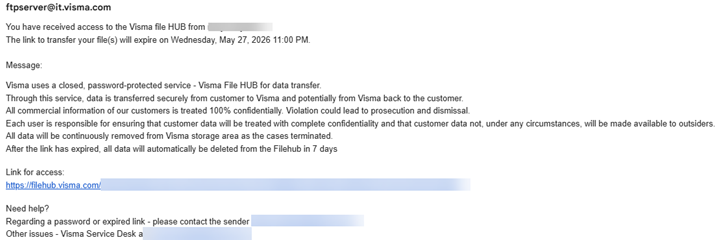
- Click the link under Link for access – a new tab will open in your browser.
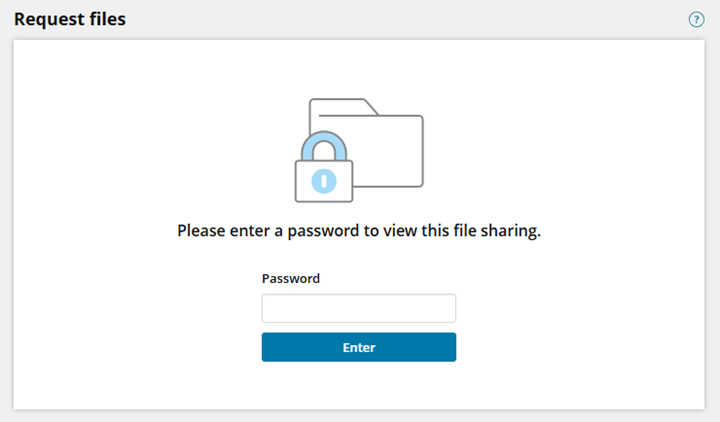
- Enter the password you have received in a separate message in the support request.
- Add an attachment, for example a Word file or Excel file, to the upload files field.
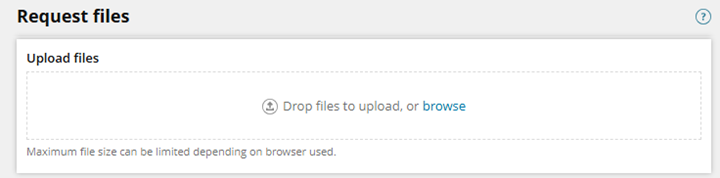
- When the file has been uploaded, you can close the window.
The same link can be opened again and again with the same password, as long as the link is valid. If you open the link again, you will not see the files that have already been uploaded.
Changing the employee phone number
The employee's phone number is recommended to be saved when creating a new employee. Change the saved information as follows:
- Open the view by selecting Salaries > Personnel > Employee listing.
- Click the employee's name.
- Edit the Phone field.
Frequently asked questions
How do I securely deliver sensitive personal information to support?
Do not send personal identity codes by email. Support will send a link to the secure Visma Filehub service, through which the information is delivered safely.
Can I change my own username?
Yes, you can change your own name from the top bar of the interface under My basic settings.
Keywords: Employee, personal information, name change, personal identity code, nationality, phone number, data security, GDPR, Filehub
Did you find it helpful? Yes No
Send feedback