This guide instructs you on how to edit your own basic settings in Netvisor, including changing your phone number, email address, and the interface language. Additionally, the guide covers communication settings management and message scheduling.
Open your basic settings by selecting your own name at the top > Basic user settings.
CONTENTS
- User name update
- Choosing a preferred name
- Basic user settings
- Communicated matters
- Communication scheduling
- Frequently asked questions
When you click your name at the top right in Netvisor, in the Basic user settings section you can:
- edit your own phone number
- edit your own email address
- change the interface language (Finnish, English or Swedish).
The selected interface language remains in effect until you change the language again.

User name update
From 1 April 2026 onwards, the user name is updated to Netvisor when the user logs in with bank authentication. The name information is retrieved via strong authentication, which is based on the person’s official information.
Proceed as follows when there is a change in the name information:
- Log in to Netvisor with your bank credentials (strong authentication).
- Let the authentication complete, after which the system checks your official name information.
- Wait for the name information to be updated automatically in Netvisor.
The change also affects employees who have been added as users. In this case, the name information is also updated in the employee’s details.
Choosing a preferred name
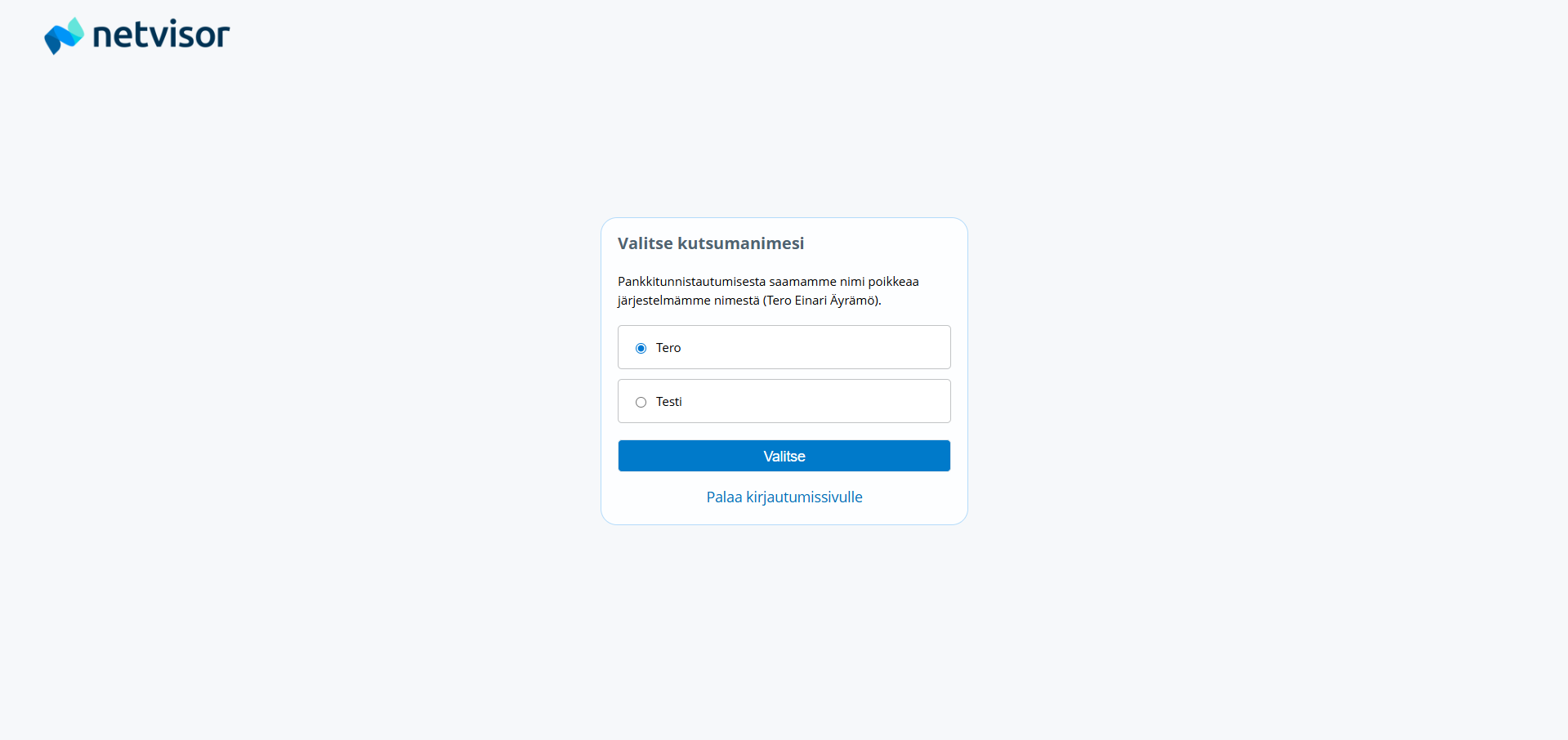
If the first name of a user invited to Netvisor does not match the first name given when the user was invited, the invited user will receive a notification to confirm their preferred name when logging in. The last name is always updated automatically. The name information is retrieved via strong authentication.
Confirm the preferred name as follows:
- Log in to Netvisor with bank authentication.
- Wait for the preferred name confirmation view to open.
- In the view, select the first name you use as your preferred name.
- Confirm the selection.
The name can be changed afterwards
- from the top right corner of the Netvisor browser version under your own name
- select Basic user settings
- click Select preferred name
Basic user settings
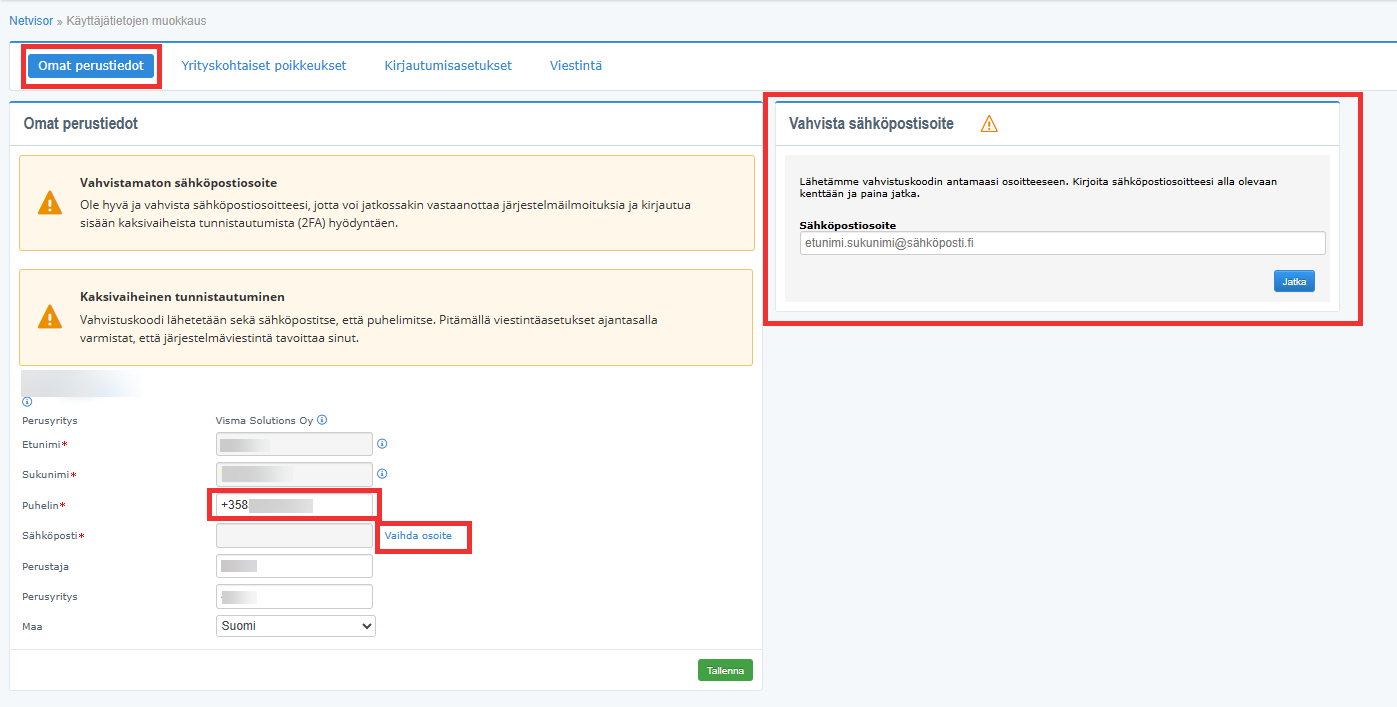
On the basic data tab, you can define your communication contact information.
Edit your own basic data as follows:
- Select your own name at the top > Basic user settings > Basic data tab.
- Edit the phone number if necessary.
- The phone number can be edited by a KH user.
- Edit the email address if necessary.
- The email can only be edited by the user themselves.
The name information cannot be edited. If the user’s name has changed, log in to Netvisor using strong authentication, after which the name information will be updated automatically.
Email address confirmation
The email address in the basic data must be confirmed so that, for example, system communication and 2FA authentication requests are directed correctly.
Confirm the email address as follows:
- Go to Basic user settings > Basic data.
- Enter the email address you want to use.
- Click the function intended for confirming the email (for example “Confirm”).
- Wait for the system to send a code to the entered email address.
- It may take several minutes for the code to arrive.
- Enter the received code in Netvisor.
- Save the confirmation.
The email address only needs to be confirmed once. After this, the address is confirmed.
You can change an already confirmed email as follows:
- Go to Basic user settings > Basic data.
- Click “Change address”.
- Enter the new email address.
- Confirm the new address in the same way as above.
If the “Change address” and confirmation links are not visible:
- clear the browser cache and try again.
If you receive a notification “The given email address is already in use”, please contact Netvisor support.
On the company-specific exceptions tab, you can define company-specific exceptions to your contact information.
Define company-specific exceptions as follows:
- Go to Basic user settings > Company-specific exceptions tab.
- Select the company for which you want to define different contact information.
- Enter the company-specific contact information (for example a different email address).
- Save the changes.
With company-specific exceptions, you can define a different email address to be visible for different companies. These contact information details do not affect system communication information, which is always the same regardless of the company. You can only define changes for yourself.
On the login settings tab, you can see the validity of your access rights for the currently active company.
View the login settings as follows:
- Go to Basic user settings > Login settings tab.
- Check the validity of the access rights for the active company.
You cannot change your own login settings. The KH user must make the necessary changes.
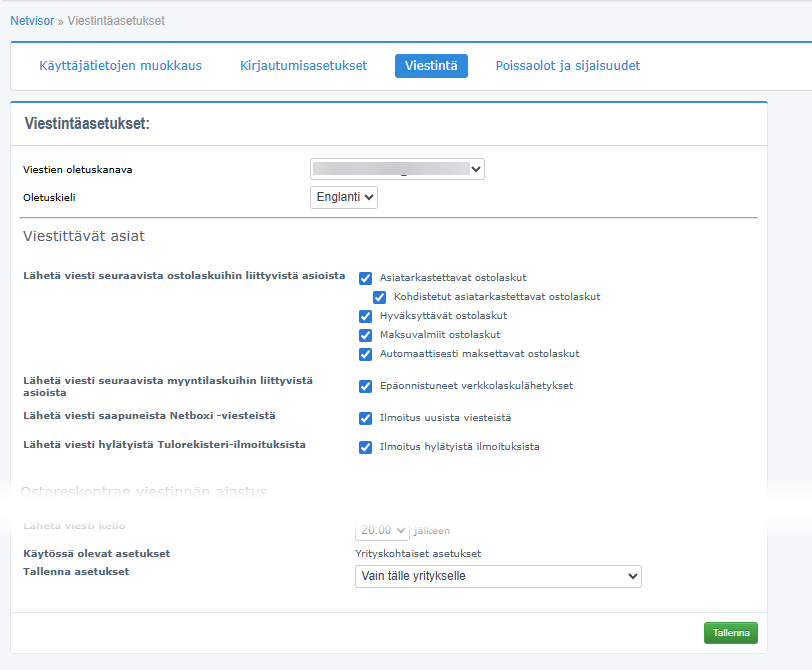
On the communication tab, you can define the matters to be communicated from Netvisor and the use of the communication email address.
Define the communication settings as follows:
- Go to Basic user settings > Communication tab.
- Make sure that an email address has been added to and confirmed for the communication email address.
- Select email as the default channel for communication if you want to receive messages by email.
To the communication email address, you will receive, among other things:
- messages about purchase invoices that have not been reviewed
- messages about purchase invoices that have not been approved
- information about possible disruption notifications.
Two-factor authentication (2FA) messages are sent even if the option “No system communication” is selected.
For communication about purchase invoices and Netbox messages to work, a confirmed email address must be added on the edit user information tab. The email can be added and confirmed only by the user themselves.
Editing the communication email address
If there is an error in the communication email address, such as a capital first letter, edit the address as follows:
- Hover your mouse over your name in Netvisor and click “Basic user settings”.
- Go to the edit user information tab.
- Click “Change address” and make the necessary changes.
Communicated matters
In the communicated matters section, you can choose which events you receive messages about.
Define the communicated matters as follows:
- Go to Basic user settings > Communication tab > Communicated matters.
- Select the events you want to receive messages about.
To receive messages about the review/approval of purchase invoices and possibly overdue purchase invoices, you must have rights to these in sales and Accounts payable rights.
You can select the following message types:
- Send a message about invoices to be sent during the week of automatic reminders – sends once a week on monday by email a summary of soon-to-be-sent reminders, notices, and collection assignments/letters.
- Requires the Automatic reminders and collection service to be enabled.
- Failed e-invoice deliveries during the day – you can order an email notification about e-invoice deliveries that have encountered errors.
Communication scheduling
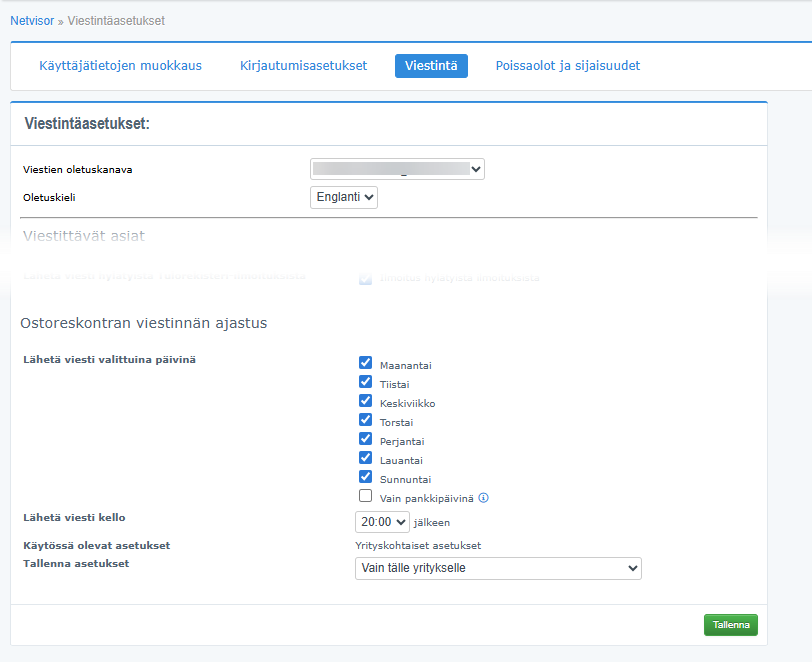
On the communication tab, in the Accounts payable communication scheduling section, you can define when the system sends messages, for example about invoices to be reviewed.
Define the communication scheduling as follows:
- Go to Basic user settings > Communication tab > Accounts payable communication scheduling.
- Select the times when you want the system to send messages (for example about invoices to be reviewed).
- Save the settings.
You can also define schedules on a company-specific basis. The email address used for communication cannot be defined on a company-specific basis.
Frequently asked questions
How do I edit my basic settings in Netvisor?
Click your name at the top right and go to the “Basic user settings” section. You can edit your phone number, email address, and the interface language.
How do I confirm my email address?
Go to Basic user settings > Basic data, enter the email address, request a confirmation code, wait for the code to arrive in your email, and enter the code in Netvisor. The confirmation is done only once.
What should I do if the email confirmation or “Change address” link is not visible?
Clear the browser cache and try again. If you receive a notification “The given email address is already in use”, please contact Netvisor support.
Can I set a different email address for different companies?
Yes. You can define company-specific exceptions on the Company-specific exceptions tab. This does not affect the system communication email address.
How do I receive email notifications to my account?
Make sure that an email address has been added and confirmed on the Communication tab and that the default channel for communication is email. In the Communicated matters section, select the events you want to receive messages about.
How can I edit the email address in the communication settings?
Go to Basic user settings > Edit user information tab and click “Change address” to make changes.
How is the user name updated to Netvisor?
From 1 April 2026 onwards, the name is updated automatically when you log in to Netvisor with bank authentication. The name information is retrieved from official records via strong authentication.
How do I choose a preferred name if the first name in the invitation does not match?
Log in to Netvisor, confirm the preferred name in the view that opens during login, and select the first name you use. The name can be changed later from your own Basic user settings.
Where can I adjust when messages related to purchase invoices are sent?
Go to Basic user settings > Communication tab > Accounts payable communication scheduling and define the times when the messages are sent.
Does Netvisor send 2FA messages even if I have selected “No system communication”?
Yes. Two-factor authentication (2FA) messages are always sent, even if “No system communication” is selected.
Keywords: Netvisor, basic user settings, communication settings, email confirmation, interface language
Did you find it helpful? Yes No
Send feedback