This guide covers the selection of cost object sources for salary types and their effects. The guide describes different source options, such as allocation curve, payslip row, employee default cost objects, and selected cost objects, as well as their application to different salary type groups.
CONTENT
Cost object source
Select the source of cost objects in the salary type settings.
Salaries > Payroll > Salary model management > Company-specific salary types
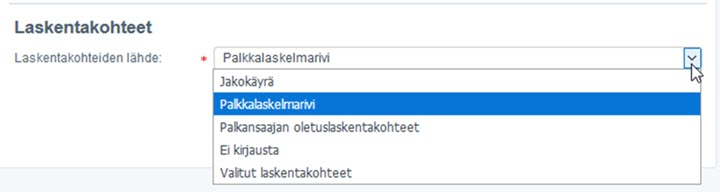
Select the source of the cost object for those salary types that belong to the groups "Salaries and allowances", "Fringe benefits", and "Holidays and absences".
- Allocation curve
- Payslip row
- Employee default cost objects
- No entry
- Selected cost objects
You cannot set the source of the cost object from the salary type settings for salary types belonging to the "Tax-exempt allowances for expenses" and "Deductions" groups. Exceptionally, from the Deductions group, TyEL and TVM are always automatically directed according to the allocation curve, which are visible on the payroll bookkeeping voucher. If the salary type has balance sheet account allocations, a cost center is not automatically formed.
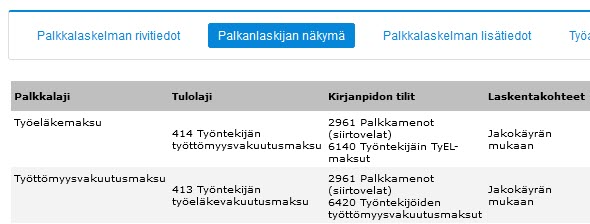
Cost centers for paid holiday pay
When you pay holiday pay and holiday bonus, the transaction is recorded on the payroll voucher. Since the payment dissolves the holiday pay debt formed in bookkeeping, the transaction is recorded solely on balance sheet accounts. Therefore, the entry does not affect the cost object calculation in bookkeeping. Thus, in holiday calculation, the timing of holiday payment does not affect the cost object calculation of holiday pay debt at all.
Read more, help guide: Handling holiday pay debt in bookkeeping
Employee default cost object
Select multiple desired default cost objects in the employee's basic data, which are automatically saved to the payslip. Default cost objects are saved when forming the payslip with the allocation distribution defined in the employee's basic data. You can find the employee's basic data in the view Salaries > Personnel > Employee listing > Select the employee to be handled > Employee information
If multiple default cost objects are defined in the employee's basic data, the default cost object information appears precompleted on the working time entry to be entered according to the cost object with the highest allocation percentage.
You can read more about the topic in the Community: Possibility to give Default cost object divided into percentage shares in employee's basic data.


If the salary type is given the source of the cost object as "employee default cost objects", the cost object allocation is formed on the bookkeeping voucher according to this setting, following the employee's basic data default cost objects.
Note! In these cases, the cost object report follows the employee's current default cost object, not the default cost object at the time of voucher formation.
Payslip row
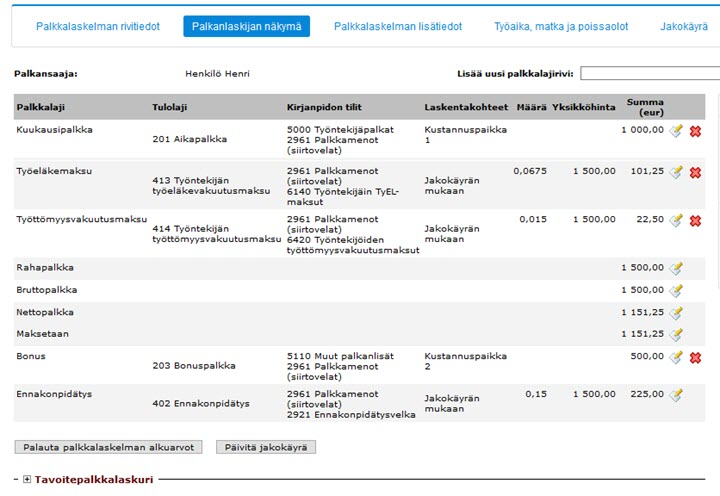
Salary types can also be manually recorded on the payslip. For those salary types that belong to the "Salaries and allowances" and "Holidays and absences" salary type groups, you can also record cost object information that affects the formation of the allocation curve. You can select the source of the cost object as "Payslip row" in the company-specific salary types settings. Manually set the selected cost objects for the salary type in the payroll process.
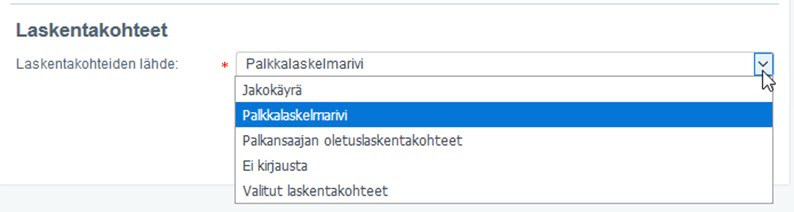
Added salary type rows affect the total sum on which the calculation of allocation curve ratios is based.
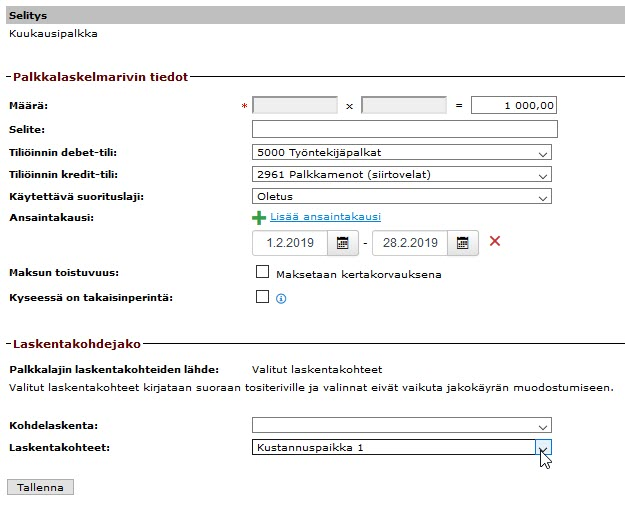
Check the source of the cost object for salary types from the "Payroll accountant view" tab on the payslip.
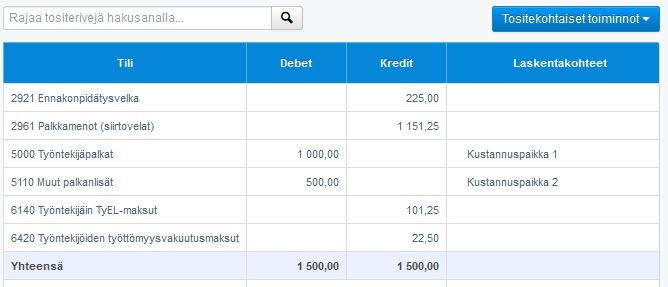
Payroll voucher cost centers are formed according to the selected cost objects for salary type rows.
Selected cost objects
"Selected cost objects" only works for salary types that are automatically formed on the payslip from salary basis management, such as "Monthly salary" or if the payslip is brought into the payroll process as an integration from another system. Holiday calculation salary types do not get cost distribution with selected cost objects.
You can select, for example, fixed cost objects for allowance salary types (evening allowance, night allowance, overtime 50%, overtime 100%) from the salary type settings, so that all allowances are directed to their own cost object, but the cost center for allowances is the same for all employees to whom allowances are paid. This way, you can differentiate, for example, that Time work earnings are distributed according to the allocation curve to different cost centers, but allowances are directed fixedly to a separate cost center.
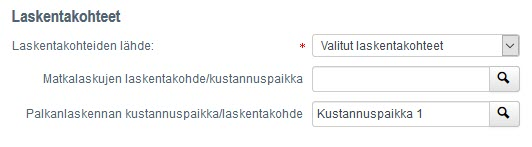
Selected cost objects for the salary type are visible on the "Payroll accountant view" tab of the payslip.
In the example image below, the salary types "Sick pay" and "HPO" have been selected in the salary type settings as cost objects "KP C" and "KP B".
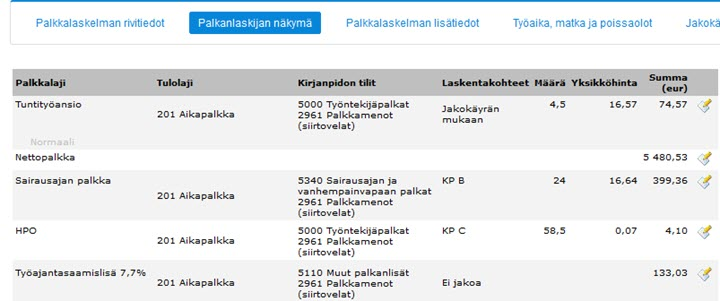
Selected cost objects are thus visible on the "payroll accountant view" tab, but not on the "allocation curve" tab. However, the allocation is formed on the bookkeeping payroll voucher. If you manually add a salary type to the payslip from the "Add new salary type row" menu, the selected cost objects for the salary type are not saved to the payslip.
Frequently asked questions
What cost object sources can I choose?
You can choose the source as allocation curve, payslip row, employee default cost objects, "No entry", or selected cost objects.
For which salary type groups can I choose the cost object source?
You can choose the source for salary types that belong to the groups "Salaries and allowances", "Fringe benefits", and "Holidays and absences".
How are cost centers for paid holiday pay handled?
When you pay holiday pay and holiday bonus, the transaction is recorded solely on balance sheet accounts because it dissolves holiday pay debt. This does not affect the cost object calculation in bookkeeping.
When should I use the "Payslip row" source?
Use the "Payslip row" source when you want to manually record salary types on the payslip and set cost objects for them manually in the payroll process.
When should I use the "Selected cost objects" source?
Use the "Selected cost objects" source for salary types that are automatically formed on the payslip (such as monthly salary) or through integration, and you want to direct them to a fixed cost object.
Keywords
cost object, cost center, salary type, salary model, allocation curve, payslip row, default cost object, selected cost objects, holiday pay, bookkeeping, voucher
Did you find it helpful? Yes No
Send feedback