Netvisor Assistant is an AI-based service designed to assist entrepreneurs and accounting office users by answering questions directly in the Netvisor interface. Questions can relate to company financial data or the use of Netvisor. The Assistant responds to questions in the user's language: Finnish, Swedish, or English.
The service will be available for testing to a limited customer group in December 2025. Due to high interest, new test users are not currently being sought.
CONTENT
Available data
Netvisor Assistant utilizes multiple data sources to provide accurate and useful answers:
- Company data: Company revenue and company form
- Access rights: The Assistant provides only information that the user has access to within their access rights
- Company financial data: Profit and loss statement, balance sheet, cash flow forecast, customer group report by financial period and monthly, open receivables, open accounts payable, and customer purchasing behavior report
- Other sources: Netvisor support page instructions, Community Important announcements, Usage tips and Product news, Netvisor Marketplace, and the vero.fi website.
Using Netvisor Assistant
You can find Netvisor Assistant through the A-button in the top right corner of the Netvisor browser version (see image below, 1). You can ask questions directly (see image below, 2) or choose from suggested questions, such as "Analyze how my company is doing." (see image below, 3).
From the three dots next to the title bar (see image below, 4), you can start a new conversation, view your conversation history, or provide verbal feedback. The arrow button (see image below, 5) allows you to minimize the chat window, and the cross (see image below, 6) ends the conversation. You can return to the conversation through the conversation history.
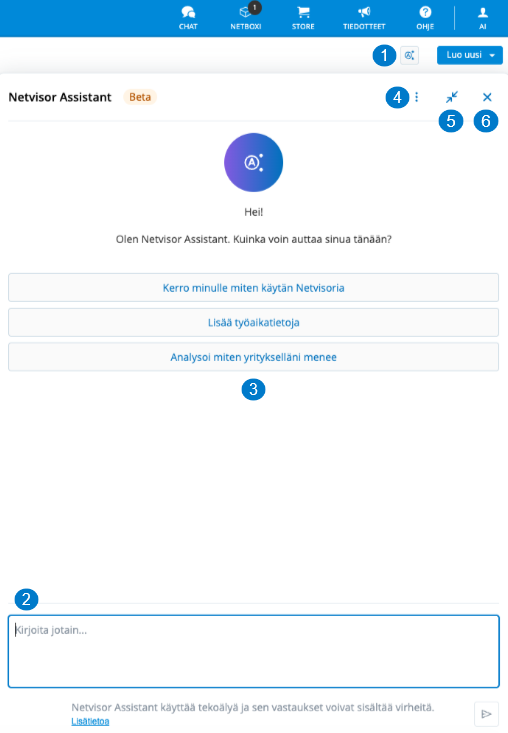
Please note that there may be a slight delay in generating responses produced by the AI. You can view from the "Reasoning" section above the response which sources or data Netvisor Assistant utilized in forming the response, such as the company's profit and loss statement or balance sheet.
We recommend starting a new conversation from the three dots when the topic of the question changes, so that the Assistant responds to the new topic without using the old conversation as a basis for its answers. You can provide feedback on the usefulness or accuracy of the conversation as verbal feedback or with a quick button at the end of the Assistant's response. Based on feedback, we can improve the service even further.
Pricing
The service is included in all Netvisor service packages, and no usage fee is charged.
Security and privacy
Conversations are stored in the user's own conversation history, where the user can also return to previous conversations.
Netvisor Assistant does not collect or use conversations as automatic training material. However, functionality is improved by reviewing previous conversations manually to ensure quality.
Netvisor Assistant is used with the user's access rights. This ensures that the Assistant does not access any information to which the user does not have access rights.
There is also an option to provide user feedback via a separate feedback link in connection with the Assistant. Feedback is used to improve the service.
Keywords: Netvisor Assistant, Assistant
Did you find it helpful? Yes No
Send feedback